
A Leica Rugby rotary laser is a precision tool used for tasks where accurate measurements matter, from grading and concrete work to ceiling installation and form alignment. Like any piece of equipment that spends its days on active job sites, it performs best when it's maintained regularly.
The Leica Rugby Series, including models such as the Rugby 610 through Rugby 680, is built to handle tough working conditions. Even so, daily exposure to dust, vibration, moisture, and occasional knocks can affect performance over time. Small issues often go unnoticed until they begin to impact accuracy in the field.
Regular maintenance helps prevent those problems. Keeping the laser clean, storing it properly, checking calibration, and looking after the batteries can all extend the life of the unit and reduce the risk of unexpected downtime.
In this guide, we'll cover the basic maintenance steps that help keep your Leica Rugby laser working accurately. A few minutes of routine care can help protect your equipment and keep it ready for the next job.
Cleaning and Daily Care
Construction sites are tough on equipment. Dust, dirt, moisture, and concrete splatter can quickly build up on a rotary laser during normal use. Leica Rugby lasers are designed for these environments, but regular cleaning still helps prevent unnecessary wear and keeps the laser operating properly.
A few minutes of maintenance at the end of the day can make a difference. Keeping the housing, laser window, and battery contacts clean reduces the chance of problems developing over time.
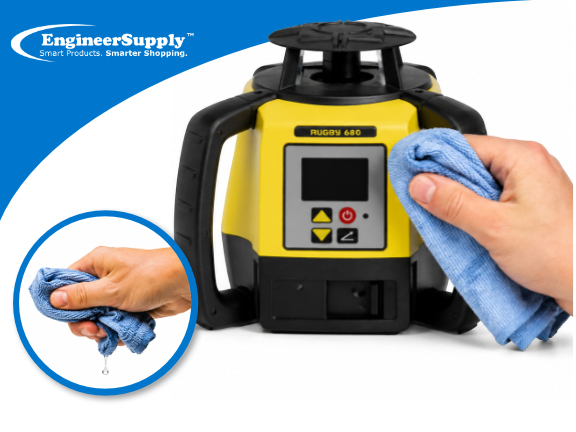
Wipe the Housing After Each Use
After using the laser, wipe the exterior with a soft cloth dampened with clean water. This removes dust and debris before it collects around buttons, seals, and moving parts.
Avoid using:
- Acetone, paint thinner, alcohol-based cleaners, or other strong solvents
- Abrasive pads, brushes, or rough shop rags
- Compressed air directed into openings at close range
Strong cleaning products can damage the rubber overmolding and protective seals. Once the unit is clean, allow it to air dry before placing it back in its case.
Clean the Laser Window Carefully
The laser window has a direct effect on beam quality. Dirt, fingerprints, and scratches can reduce visibility and make the beam harder to see, particularly over longer distances.
Use a soft lens cloth or optical tissue and wipe gently across the surface. If dirt does not come off easily, lightly dampen the cloth with clean water. Avoid scrubbing.
Do not use paper towels, rough fabrics, or abrasive materials. Even small scratches can affect performance over time.
Calibration and Accuracy Checks Trust, But Verify
Rotary lasers are precision instruments. Regular use, vibration during transport, temperature changes, and occasional impacts can gradually affect calibration. The changes are often small enough to go unnoticed until measurements start looking inconsistent.
Early Signs of Calibration Drift
Pay attention to changes in how the laser performs. Common warning signs include:
- Grade readings that no longer match previous measurements
- Inconsistent results after repositioning the laser
- Frequent double-checking to confirm level
- Setups that take longer than usual to verify
If these issues appear repeatedly, it may be time to have the unit inspected.
Annual Professional Recalibration
A professional calibration check once a year is a good practice for any Leica Rugby laser, regardless of how often it is used. Internal components can shift slightly over time without showing any visible signs of wear.
Annual calibration is particularly important for applications where tight tolerances matter, such as foundation work, floor leveling, machine installation, and infrastructure projects.
Perform Field Checks on Site
Before starting a critical job, and again when the work is complete, verify the laser's accuracy with a simple field check.
- Set the laser on a stable tripod approximately 15 to 20 feet from a flat wall.
- Mark the beam location on the wall (Point A).
- Rotate the laser 180 degrees and mark the new beam position (Point B).
- Measure the difference between the two marks.
If the difference exceeds the manufacturer's tolerance, remove the unit from service and have it inspected.
This process takes only a few minutes and can help catch accuracy problems before they affect a project.
Check Calibration After an Impact
Any significant drop or impact should be treated seriously, even if the laser appears to function normally afterward. Internal components can shift without obvious external damage. If the unit has been dropped, inspect it and verify its accuracy before putting it back into service.
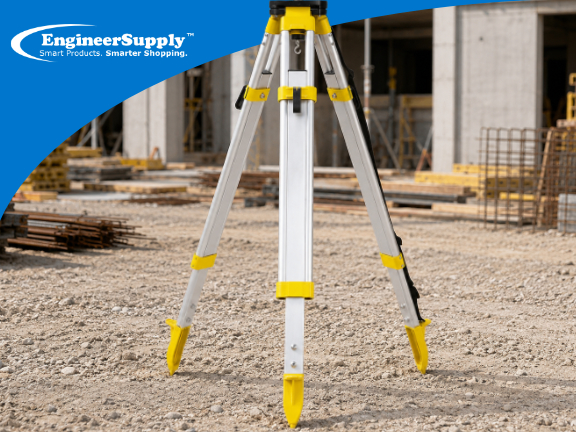
Tripod Stability: Start With a Solid Base
A laser can only be as accurate as the surface it sits on. Before beginning work, make sure:
- Tripod legs are firmly positioned on stable ground
- The tripod head is reasonably level
- All clamps and wing nuts are tightened
- The mounting screw is secure
Wind, heavy equipment, nearby foot traffic, and unstable ground can all affect measurements. Problems that appear to be calibration issues sometimes come from movement in the setup itself.
Safe Storage and Transport Protecting Your Investment
Many laser repairs are caused by damage during transport or storage rather than while the unit is in use.
Store the laser in its hard carrying case whenever it is not being used. The case helps protect it from dust, moisture, vibration, and accidental impacts.
During transport:
- Secure the case so it cannot slide or tip over
- Avoid placing heavy tools or materials on top of it
- Keep it away from excessive heat, including vehicle dashboards and engine compartments
Before moving the laser, turn it off completely. Sudden impacts while the internal head is spinning can damage sensitive components.
On active job sites, protect tripods from accidental contact. If the setup will be left unattended, mark the area clearly or remove the equipment until it is needed again.
Battery Maintenance - Small Habits, Big Payoff
The Leica Rugby Series can operate with either alkaline batteries or rechargeable lithium-ion battery packs. Rechargeable packs are usually the better choice for contractors and survey crews who use their equipment every day, while alkaline batteries are useful as a backup power source or for occasional use.
A little attention to battery care can help prevent downtime and extend battery life.
Remove alkaline batteries during storage
If the laser will be stored for several weeks or longer, remove any alkaline batteries before putting it away.
Over time, alkaline batteries can leak and corrode battery contacts. In severe cases, leakage can damage internal components and lead to costly repairs.
Caring for rechargeable batteries
Lithium-ion battery packs require very little maintenance, but a few simple habits can help keep them in good condition:
- Avoid storing batteries at a full charge for extended periods
- If the laser is used infrequently, perform a complete discharge and recharge cycle every few months
- Rotate spare battery packs so they receive regular use
- Inspect battery contacts occasionally and clean them if dirt or corrosion is present
Store batteries properly
Keep batteries in a cool, dry location away from direct sunlight and excessive heat.
Avoid leaving batteries inside vehicles for long periods, especially during hot weather. High temperatures can shorten battery life and reduce overall performance.
Common Leica Rugby issues and quick checks
When a laser starts behaving unexpectedly, the cause is often something simple. Before sending the unit for service, check a few basic items first.
Laser will not level correctly
- Confirm that the tripod is stable and positioned on solid ground
- Check that the laser is mounted securely
- Inspect the setup area for vibration from nearby equipment or traffic
Beam appears weak or difficult to see
- Clean the laser window with a soft lens cloth
- Check for dirt, dust, or concrete residue on the glass
- Verify that battery power is sufficient
Rotation appears inconsistent
- Check battery charge level
- Confirm that the battery pack is seated properly
- Inspect the unit for signs of impact or damage
Measurements vary between setups
- Perform a field accuracy check
- Verify that the tripod and mounting hardware are secure
- Confirm that the laser has completed its self-leveling process before taking measurements
If problems continue after these checks, have the laser inspected by an authorized Leica service center. A calibration check can often identify issues that are not visible during normal operation.
| Model |
Best For |
Key Feature |
| Rugby 610 |
General leveling |
One-button operation |
| Rugby 620 |
Grading + leveling |
Manual single-axis slope |
| Rugby 640 |
Multi-purpose interior/exterior |
Scan 90° feature |
| Rugby 680 |
Advanced grade work |
Dual-axis dial-in + Smart Slope |
Maintenance Is the ROI on Your Laser Investment
A Leica Rugby rotary laser is built for tough job-site conditions, but regular maintenance is still important. Cleaning the unit, storing it properly, checking accuracy periodically, and looking after the batteries can help prevent problems before they affect your work.
Most of these tasks take only a few minutes, yet they can help keep the laser operating accurately and reduce the risk of unexpected downtime. With consistent care, your Rugby laser can continue delivering dependable performance for years of daily use.
If you're looking to expand or upgrade your equipment, explore the Leica Rugby Series at Engineer Supply or contact their team for guidance on selecting the right model for your work.
For a Quote or Personalized Guidance:
Call or Text: 434-755-7717
Email: sales@engineersupply.com
Need Assistance with Your Leica Rugby Laser?
Our service and repair team is here to help with any Leica Rugby laser repair, calibration, or general maintenance services you may need.
Customer Support: 800-591-8907
Repairs & Maintenance: Call or Text 434-200-8477
FREQUENTLY ASKED QUESTIONS
What part inside the laser is most sensitive?
The compensator is the most sensitive part. It helps keep the laser level and can be affected by strong shock or drops.
What part wears out first in a rotary laser?
The moving parts like the spinning motor and internal stabilizer parts are usually the first to wear over long use.
Can internal shock damage be invisible?
Yes. The laser may still turn on after a drop, but internal parts like the leveling system may be slightly misaligned.
Where to buy the product?
Engineer Supply is the largest dealer in Leica products and provides access to genuine Leica Rugby rotary laser models along with professional support and availability for construction-grade equipment.
Why Choose Engineer Supply?
We offer servicing and shipping the product, along with reliable customer support to help ensure you receive the right equipment and assistance when needed. We also aim to provide genuine products and help guide customers with basic product information, maintenance advice, and ordering support so you can make informed decisions and keep your equipment operating properly.
More Leica Rotary Laser Resources