
You've invested in a rotary laser. You've set it up. You've taken your readings. And then midway through the pour, the frame, or the grade something is off. By centimeters.
Sound familiar?
Rotary laser levels are among the most powerful tools on a construction site. A quality rotary laser is accurate to within 1/16 of an inch per 100 feet, ten times more precise than a traditional spirit level. But that precision only holds when the setup is done right.
The problem is that setup mistakes are easy to make and hard to spot until the damage is done. Whether you're leveling floors, setting out foundations, or doing grade work, a small error in setup compounds across the entire job.
This guide breaks2. Skipping Proper Leveling
down the most common Leica rotary laser setup mistakes and exactly how to avoid them.
Common Leica Rotary Laser Setup Mistakes
1. Unstable Setup: The Root of Many Errors
Problem:
Placing the laser on unstable surfaces, such as soft ground, loose gravel, or an unstable tripod, is one of the most common setup mistakes. The laser might appear level at first, but small shifts or movements over time can lead to significant inaccuracies.
Fix:
- Use a solid tripod that provides a stable base for the laser.
- Ensure the tripod legs are firmly pressed into the ground.
- Avoid high-traffic areas where the setup may get bumped or disturbed.
Tip: Mark the area where you set up to ensure stability throughout the project.
2. Skipping Proper Leveling
Problem:
Even though Leica rotary lasers are self-leveling, they still need to start from a reasonably level position. If the laser is too far out of level, it may not correct itself properly, leading to inaccurate results.
Fix:
Level the unit manually using the bubble vial before powering it on. This ensures the laser starts in a reasonable position.
Tip: Always perform a quick check to ensure the laser is roughly level before turning it on.
3. Not Letting the Laser Fully Self-Level
Problem:
Starting work too quickly is a common mistake. If you begin taking readings before the laser has finished leveling, the readings may be inaccurate.
Fix:
- Always wait for the laser to fully self-level before beginning work.
- Look for steady rotation and no warning lights or indicators.
Fix: Check the indicator lights and ensure the unit has leveled properly before taking measurements.
4. Ignoring Calibration: Why It’s Crucial
Problem:
Rotary lasers will drift out of calibration over time, especially after improper transport or handling of the instrument. These errors may not be immediately noticeable but can compound and affect overall job accuracy.
Fix:
Perform regular calibration checks (e.g., a two-peg test) to confirm the instrument is operating within acceptable accuracy.
Tip: Have your instrument calibrated professionally at least once a year to avoid increased deviation that will impact your work.
5. Incorrect Height of Instrument (HI) Setup
Problem:
Incorrect setup of the Height of Instrument (HI) is a frequent source of error. This can happen when you mix benchmarks, forget to record HI, or change reference points mid-job.
Fix:
- Establish a clear benchmark and double-check all rod readings at the start of the job.
Tip: Ensure that the reference height is recorded and consistent throughout the project.
6. Improper Detector Use
Problem:
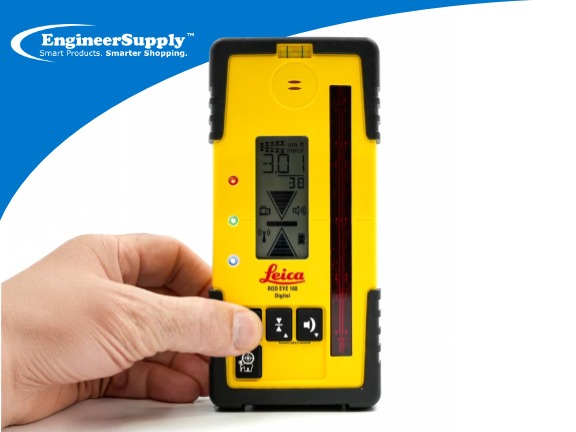
Improper use of the laser receiver (detector) can lead to inconsistent readings. This includes holding it at an angle, moving too quickly, or using the wrong accuracy setting.
Fix:
- Keep the detector vertical at all times and move it slowly across the area.
- Match the accuracy mode on the detector to the requirements of the task.
Tip: Always check that the detector’s mode is set for the level of precision required for the task at hand.
7. Sunlight and Visibility Issues
Problem:
Outdoor visibility can affect the accuracy of your laser. In bright sunlight, the laser beam becomes difficult to see, increasing the risk of guesswork. Reflective surfaces such as glass, metal, or water can also interfere with the laser receiver, causing inconsistent or false readings.
Fix:
Use a laser receiver instead of relying on visual alignment for outdoor applications.
Tip: Check that the receiver is functioning properly in bright conditions and be mindful of reflective surfaces in the work area.
8. Battery and Power Issues: Don’t Let Low Battery Disrupt Accuracy
Problem:
Poor terminal connections and low battery levels can significantly impact the laser’s performance. This can lead to weak signals, intermittent operation, and improper rotation, potentially resulting in the instrument needing repair.
Fix:
Start with fully charged batteries (NiMH) or new alkaline batteries when beginning a project. Never leave batteries in the instrument. Check terminals for corrosion or damage before each use.
Tip: Carry spare batteries on-site and inspect battery compartments regularly to prevent unexpected downtime.
9. Not Checking for Obstructions
Problem:
Anything in the path of the laser beam such as equipment, workers, or structural elements can distort or block the beam, resulting in measurement errors.
Fix:
Perform a 360° check of the work area to ensure the beam is clear.
Tip: Clear any objects in the laser’s path to maintain accurate measurements.
10. Using the Wrong Laser for the Job
Problem:
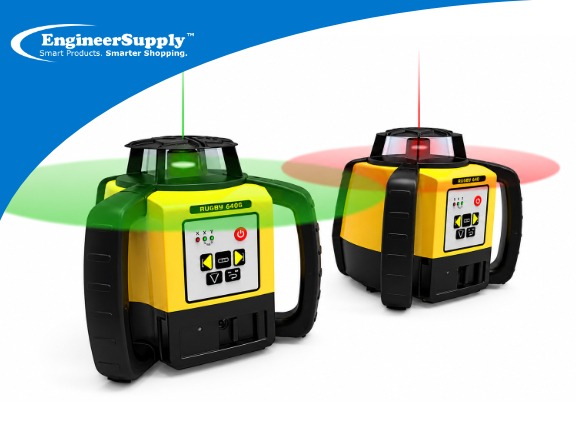
Not all Leica rotary lasers are designed for the same applications. Using a laser that is not suited for your task (level-only vs. slope) can lead to mistakes.
Fix:
Confirm that your laser model supports the specific task you are working on, whether it’s level-only or slope.
Tip: Double-check the laser specifications before beginning any task.
Better Setup Means Better Results
Most rotary laser errors happen during setup. If the setup is correct, the results will be accurate. At Engineer Supply, we always recommend checking stability, waiting for full leveling, and confirming readings before working. These basic steps help avoid mistakes and improve job site accuracy especially when setting elevations with a Leica rotary laser on construction projects. Consistent setup leads to consistent results.
For a Quote or Personalized Guidance:
Call or Text: 434-755-7717
Email: sales@engineersupply.com
Need Help with Your Leica Rotary Laser?
Our service and repair team are here to help with any rotary laser repair, calibration, or general maintenance services you might need.
Customer Support: 800-591-8907
Repairs & Maintenance: Call or Text 434-200-8477
More Articles on Leica